
Collecting your members' suggestions
A channel where your members propose ideas and vote, with a staff validation if you want one.
On this page
With suggestions, your members propose ideas for the server, and everyone votes for or against with two reactions. The staff can, if you want, validate each suggestion before it is posted.
In short
+suggestion settingsopens the panel: pick the display channel.- Your members write
+suggestion their idea. +lb suggestionsshows the best-rated ideas.
Step 1: set up suggestions
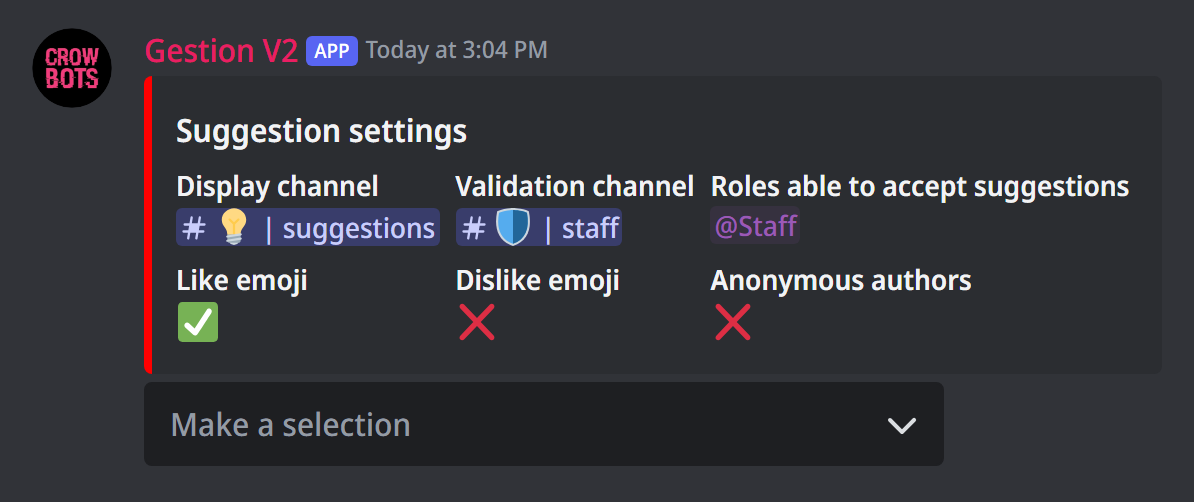
Type +suggestion settings. The Make a selection menu changes each setting:
- Display channel: where suggestions are posted and voted on. It is the only setting you need.
- Like emoji and Dislike emoji: the two vote reactions, ✅ and ❌ by default.
- Anonymous authors: with ✅, suggestions are posted without their author's name.
- Validation channel and Roles able to accept suggestions: optional, see step 3.
Step 2: propose an idea
A member types +suggestion followed by their idea, for example +suggestion Add a music channel. They can attach a picture to their message. The bot posts the suggestion in the display channel and adds the two reactions: everyone votes by clicking them.
A message written directly in the display channel also gets the two vote reactions.
Step 3 (optional): validate before posting
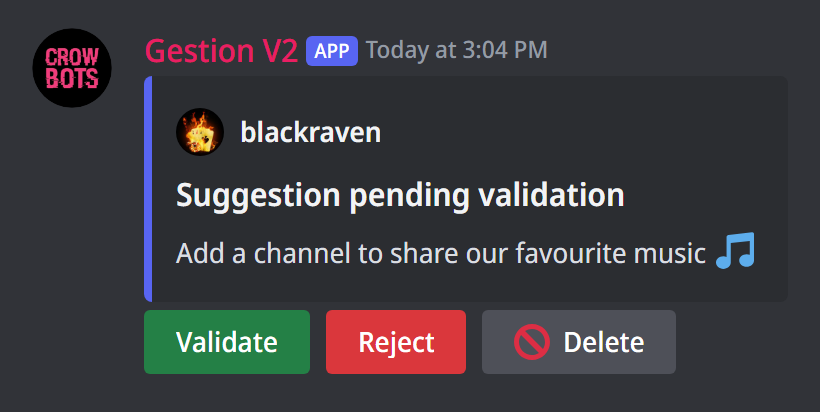
With a validation channel, a new suggestion first arrives in that channel, kept for your staff, with three buttons:
- Validate: the suggestion is posted in the display channel, with its vote reactions;
- Reject: a window asks for the reason (optional); the suggestion is marked as rejected in the validation channel, and isn't posted;
- Delete: the suggestion is erased. Its author can delete it too.
Only the roles able to accept suggestions (and the bot's owners) can validate or reject.
The leaderboard
+lb suggestions ranks the display channel's suggestions by score: the number of votes for, minus the number of votes against. Each line leads to the suggestion.
If it doesn't work
- "the suggestion feature is not properly configured": pick a display channel with
+suggestion settings. - Nobody can validate: add your staff's roles to Roles able to accept suggestions.
- The reactions don't show: the bot must be able to add reactions in the display channel.
Every command
Each command of this guide, with its arguments, its default level and examples: Suggestions.