
Automoderation
Delete spam, links and banned words without waiting for a moderator, and sanction repeat offenders automatically.
On this page
Automoderation deletes forbidden messages in your moderators' place, day and night. It has four protections, which you turn on one by one:
- antispam: messages sent too fast;
- antilink: invites to other Discord servers (or every link);
- antibadword: the words you ban;
- antimassmention: messages that mention too many members.
Then, if you want, the bot can sanction on its own the members who keep at it.
In short
+antispam on,+antilink on,+antimassmention on.+antibadword add insultfor each word to ban, then+antibadword on.+punishment setupfor ready-made automatic sanctions.
Your team is not affected
Members with a bot permission (Perm 1 or more, see permissions) bypass automoderation.
Step 1: turn on the protections
Antispam
+antispam on turns it on. By default, a member who sends 5 messages in 5 seconds triggers the antispam: the bot deletes those messages and warns them.
To change the sensitivity, give the number of messages, a slash /, then the duration: +antispam 6/10s (6 messages in 10 seconds).
Antilink
+antilink on turns it on. By default it blocks invites to other Discord servers; invites to your own server are still allowed.
+antilink all blocks every link, and +antilink invite goes back to invites only. Edited messages are checked too.
Antibadword
- Add each word to ban:
+antibadword add insult. A "word" can also be a phrase of several words. - Turn the protection on:
+antibadword on.
+badword list shows the list, +antibadword del insult removes a word, +clear badwords empties the list.
Whole words only
Banning "cat" doesn't block "catalogue": only the whole word counts, in any case.
Antimassmention
+antimassmention on turns it on: a message mentioning 6 members or more is deleted. +antimassmention 10 changes that number.
Channel by channel
Want to allow links in a partnership channel, or spam in a games channel?
+link allow #partnershipsturns the antilink off in that channel;+spam allow #gamesturns the antispam off in that channel;denydoes the opposite (the protection applies in that channel even if it is off elsewhere), andresetmakes it follow the server's setting.
Step 2: sanction automatically
Deleting a message isn't always enough: some people keep going. The bot can then sanction them by itself, using strikes.
How it works: strikes
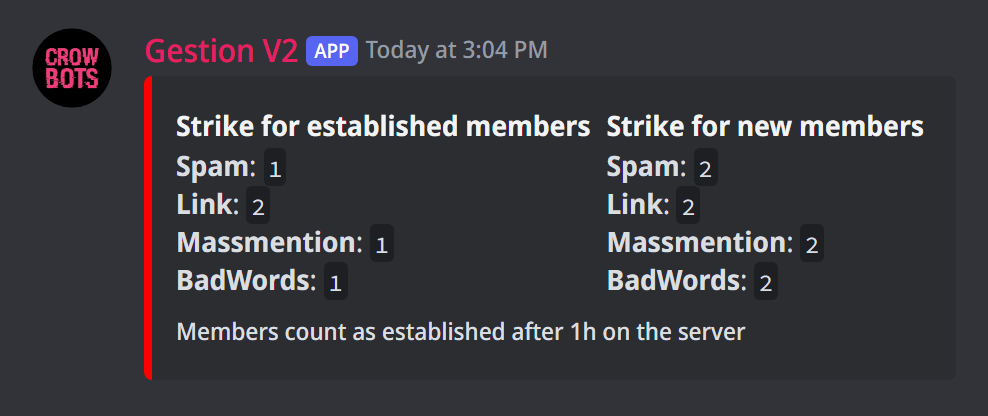
Each offence gives the member strikes (like penalty points). When they pile up too many in a short time, the bot sanctions them.
By default, an offence gives 1 strike to an established member and 2 strikes to a new one, since accounts that have just arrived are the most suspicious. A member counts as "new" during their first hour on the server.
+strikeshows how many strikes each offence gives;+strike link 2: a link now gives 2 strikes to an established member;+strike spam 3 new: spam gives 3 strikes to a new member;+ancien 1d: a member becomes "established" after one day.
A warn given by a moderator also counts as 1 strike.
Punishments
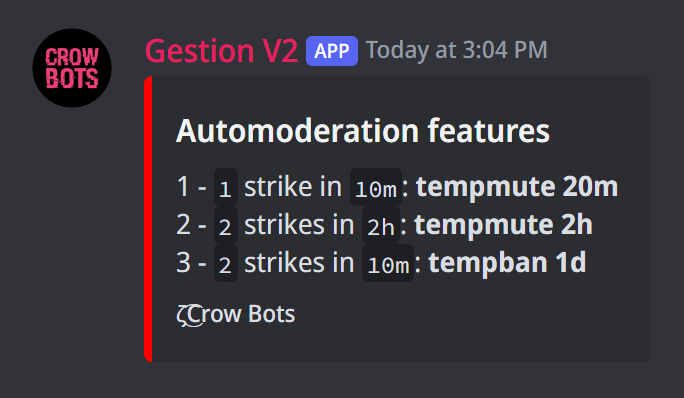
A punishment reads: "after so many strikes, within so much time, this sanction".
+punish add 3 1h tempmute 10m: 3 strikes within an hour give a 10-minute mute.
The possible sanctions are mute, tempmute, kick, ban and tempban. The temporary ones take their duration at the end. You can set up to 5, from the mildest to the harshest.
+punishshows the list;+punish del 1removes punishment number 1.
The ready-made option
+punishment setup replaces your punishments with a ready-to-use list, rather strict: each offence mutes for 20 minutes, a 2nd within 2 hours mutes for 2 hours, a 2nd within 10 minutes bans for 1 day. With their 2 strikes, a new member is therefore banned for 1 day on their first offence. Then adjust with +punish.
Keeping track
Every offence is added to the member's history: +sanctions @member shows it, with who sanctioned them. To keep an eye on them, turn on the moderation log.
If it doesn't work
- A member isn't blocked: they may have a bot permission (Perm 1 or more), or the channel has an exception (
+spam/+link). - Members aren't sanctioned: check with
+punishthat there are punishments. Without any, strikes do nothing. - The bot can't mute or ban: its role must be above the member's in the role list.
- A banned word still gets through: only the whole word is blocked (see above).
Every command
Each command of this guide, with its arguments, its default level and examples: Automoderation.