
Sanctioning a member
Warn, mute, kick or ban a member, and find the history of their sanctions.
On this page
When a member breaks the rules, your team has several sanctions, from the lightest to the heaviest: the warning, the mute, the kick and the ban. Each sanction is kept in the member's history.
In short
+warn @member reason: a warning;+tempmute @member 1h reason: they can no longer write or speak for 1 hour;+kick @member reasonor+ban @member reason: they are kicked or banned;+sanctions @member: everything they have received.
Who can sanction whom
Sanctions need a permission level (Perm 1 to warn and mute, Perm 2 to kick and ban, by default: see permissions). And you can only sanction a member of a lower level than yours, or of the same level if they don't have access to the command themselves (details).
In all these commands, you can target several members at once (+warn @member1 @member2 spam), and the reason is optional.
Warning
+warn @member reason warns a member: the warning is added to their history, and they are told by direct message.
If you set up automatic sanctions, each warn counts as a strike: a member who piles up warnings can be muted, kicked or banned automatically.
Muting
A muted member can no longer write or speak on the server.
+mute @member reasonmutes them with no time limit,+unmute @memberunmutes them;+tempmute @member 1h reasonmutes them for a duration (30m,2h,7d,1h30m…): they are unmuted automatically at the end;+cmute,+tempcmuteand+uncmutedo the same, but only in the channel where you type the command;+mutelistshows the current mutes, with the time left;+unmuteallremoves them all.
A muted member who leaves the server and comes back is muted again.
Discord timeout or mute role
By default, the bot uses Discord's timeout: the member sees in their app that they are timed out, and for how long. Discord limits it to 28 days: a mute with no duration therefore ends after 28 days.
+timeout off replaces the timeout with a mute role, with no time limit:
+muterolecreates this role and sets it up in every channel (no writing, reacting or threads, no speaking in voice). Run it again after creating new channels;- or
+set muterole @roleuses a role that already exists, then+muterolesets its permissions.
+muterole reports the channels where another role explicitly allows writing: a muted member with that role could still talk there.
Kicking and banning
+kick @member reasonkicks: the member leaves the server, but can come back with an invite.+ban @member reasonbans: they can't come back until you unban them. For someone no longer on the server, give their ID.+tempban @member 7d reasonbans for a duration; the member is unbanned automatically at the end.+unbanfollowed by their username (as shown in+banlist) or their ID unbans them.+banlistshows the current bans (10 per page, with the time left for temporary bans);+unbanallremoves them all, including those of accounts banned for raiding.
When a member is banned, their messages from the last 7 days are deleted. +banclear 1h shortens that, +banclear 0 keeps all their messages.
The antiban is watching
If the antiban is on, too many kicks or bans in a short time are blocked, even through the bot: it protects you from a moderator who would abuse their rights.
The sanction history
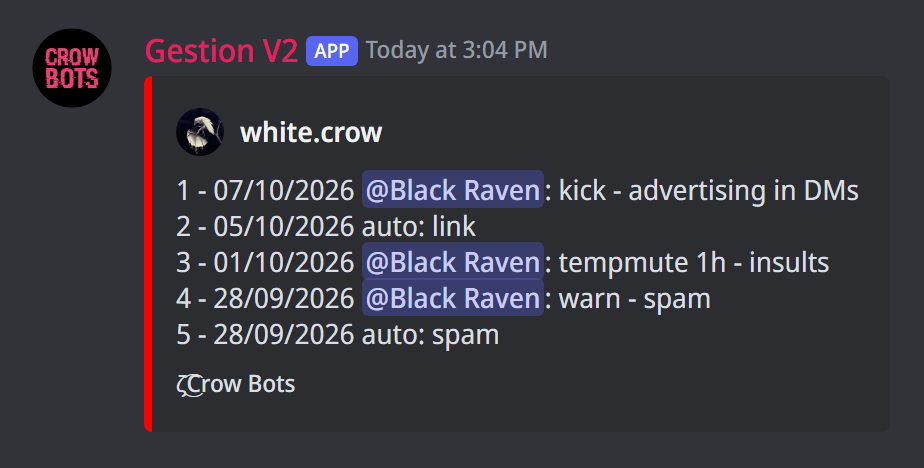
+sanctions @member shows everything the member has received, from the most recent sanction to the oldest, 10 per page. Each line gives the date, who gave the sanction (the moderator, or auto when it was the automoderation), its type and its reason.
+del sanction @member 2removes the 2nd sanction of this list;+clear sanctions @memberremoves them all, and resets their strikes;+clear all sanctionsempties the whole server's history.
Moderation notes
Notes keep a record between moderators, for example of a verbal warning. They are not sanctions, and the member isn't told.
+note @member warned about their nicknameadds a note;+note @membershows their notes, numbered from the oldest to the most recent;+note delete @member 2deletes the 2nd,+note delete @member allall their notes,+note delete allthose of the whole server.
Telling the member and keeping a record
- The bot tells the member by direct message at each sanction and when it ends:
+mp settingssets when it does. - Sanctions arrive in the moderation logs, with the moderator and the reason.
If it doesn't work
- The sanction isn't applied: the member is of an equal or higher level than yours, or their role is above the bot's.
- A muted member can still write in a channel: with the mute role, run
+muteroleagain and look at the channels it reports. - The mute stops after 28 days: that is the limit of Discord's timeout; switch to the mute role with
+timeout off.
Every command
Each command of this guide, with its arguments, its default level and examples: Sanctions, Mutes, Kicks and bans and Moderation notes.