
Managing roles and nicknames
Give or remove roles, for a while or to the whole server, limit a role, and manage members' nicknames.
On this page
This guide gathers the commands that change members' roles and nicknames: for one member, for a while, or for the whole server at once.
In short
+addrole @member @VIP/+delrole @member @VIP: give or remove a role;+temprole @member @VIP 7d: give it for 7 days;+massiverole @Member: give it to the whole server;+lockname @member Nickname: impose a nickname.
The bot's role position
The bot can only give or remove roles placed below its own, and you can't give a role above yours.
Giving and removing roles
+addrole @member @VIPgives a role,+delrole @member @VIPremoves it. Several members and several roles at once work too:+addrole @member1 @member2 @Event.+temprole @member @VIP 7dgives a role for a duration (30m,1h,2d…): it is removed automatically at the end.+temprole listshows the current ones with their time left,+untemprole @member @VIPremoves one right away.
The bot refuses a dangerous role (one granting moderation or administration rights) if the antirole is on and you aren't whitelisted, a full role (see below), and any role to a member of the rank blacklist.
Removing all of a member's roles
+derank @member removes all their roles at once, for example from a staff member whose account was hacked. It isn't a sanction: nothing is added to their history. Like sanctions, it only targets a member of a lower level than yours (details).
Some roles stay: those managed by an integration (bot roles, the booster role) and those the owners protect with +noderank add @role (+noderank del @role removes the protection). The antiraid never removes a protected role either.
A role for the whole server
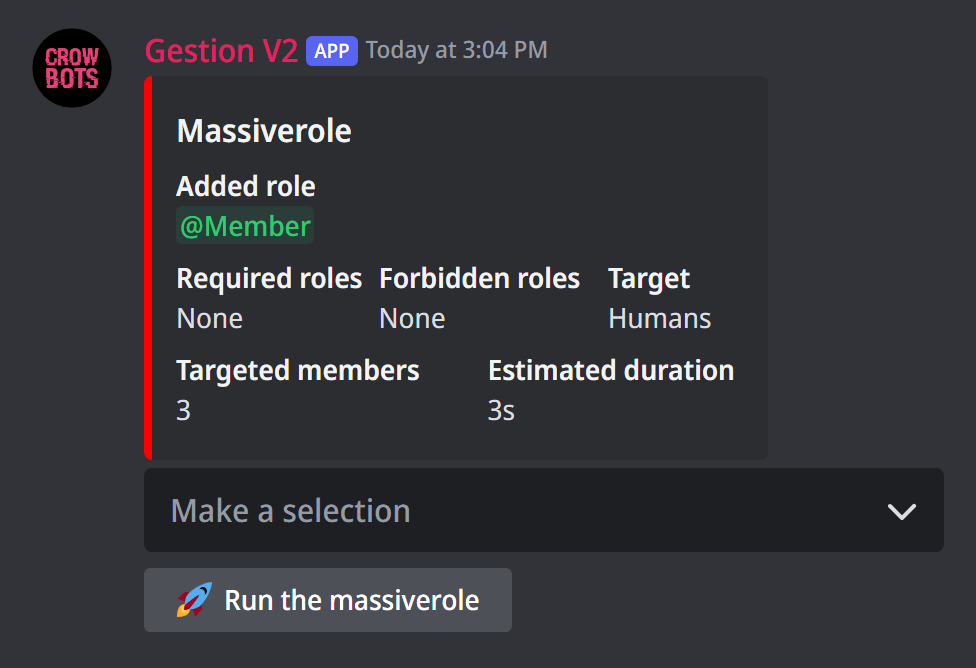
+massiverole @Member opens a panel to give that role to every member; +unmassiverole @Event opens the same panel to remove it. In the menu, you choose:
- the role, and whether to add or remove it;
- the target: humans (the default), bots, or everyone;
- the required roles: only members with one of these roles are concerned. You can also give them in the command:
+massiverole @Announcements @Verifiedgives @Announcements to those who have @Verified; - the forbidden roles: members who have one are left out.
The panel shows how many members are concerned and the estimated time. Run the massiverole starts it; a button stops it midway. Only one massiverole can run at a time on the server.
Limiting a role
+limitrole add @Winner 10 keeps a role to 10 members at most. Once full, the bot refuses to give it (with +addrole, +massiverole, role menus or custom commands), and removes it if someone adds it by hand. With 0, nobody can get it.
+limitrole shows the limited roles, +limitrole del @Winner removes the limit. Those with access to +limitrole (the owners by default) can override it.
Nicknames
+nick @member New nicknamechanges a member's nickname (32 characters at most). They can change it afterwards.+lockname @member Nicknamechanges their nickname and locks it: if they change it, the bot automatically puts back the one you chose.+unlockname @memberunlocks it: the imposed nickname is removed, and the member can choose their own again.+locknamelistshows the locked nicknames.
If it doesn't work
- The role isn't given: the bot's role must be above that role; also check it isn't full (
+limitrole) and that the member isn't in the rank blacklist. - A dangerous role is refused: the antirole is on; ask an owner to whitelist you, or do it from Discord.
- The nickname doesn't change: the bot can't rename the server's owner, nor a member whose role is above its own.
Every command
Each command of this guide, with its arguments, its default level and examples: Roles and Nicknames.