
The bot's direct messages
Choose when the bot writes to your members by direct message, and keep it from being flagged by Discord.
The bot can tell your members things by direct message: when they are sanctioned, when they join the server, when their ticket opens… +mp settings chooses, for each case, whether it does.
Why be careful
Discord watches bots that send a lot of direct messages. A flagged bot can only write to members it has already talked with. Limiting needless direct messages protects your bot.
Setting up direct messages
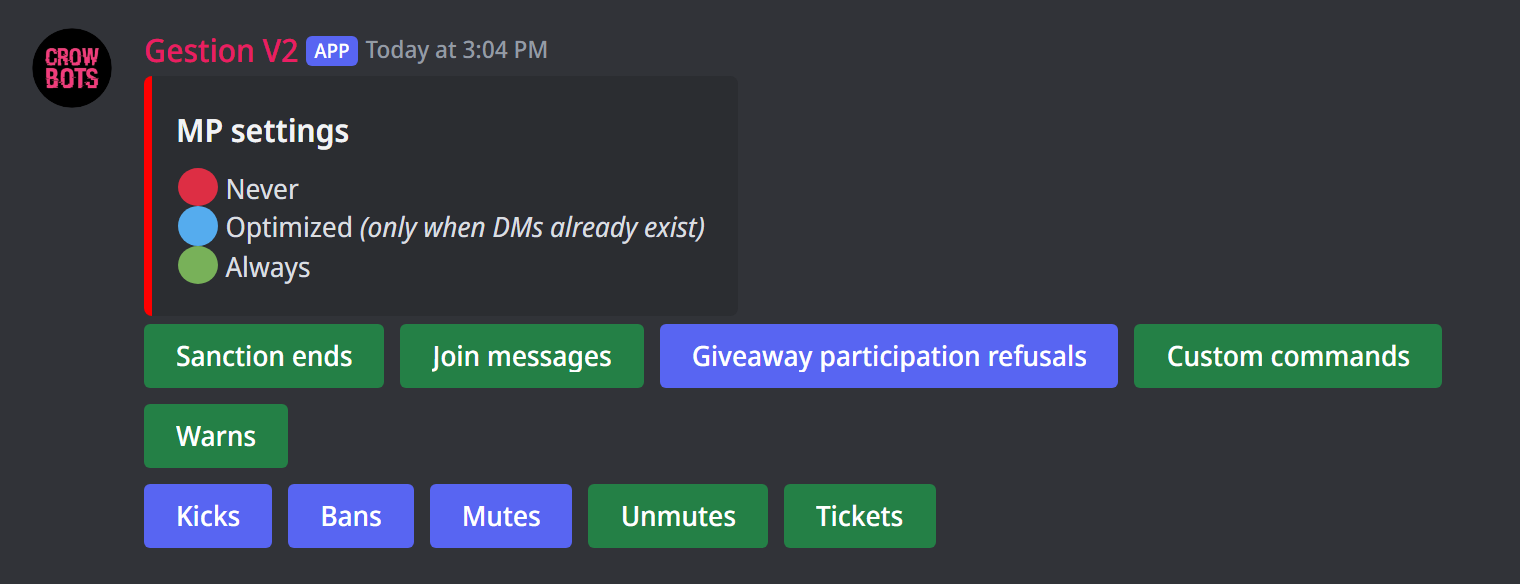
Type +mp settings (kept for the bot's owners). Each button is a case, and its colour shows its setting; click it to move to the next:
- 🟢 Always: the bot always writes;
- 🔵 Optimized: the bot only writes if it has already talked privately with that member, which can't get it flagged;
- 🔴 Never: the bot never writes.
The cases:
- Warns, Mutes, Unmutes, Kicks, Bans and Sanction ends: sanctions and their end;
- Join messages: the welcome direct message;
- Giveaway participation refusals: when a member doesn't meet the conditions of a reaction giveaway;
- Custom commands: the custom commands that answer by direct message;
- Tickets: a ticket's transcript, sent to its author when the ticket is closed.
If your bot is already flagged, the panel tells you.
Every command
Each command of this guide, with its arguments, its default level and examples: Direct messages.