
Running a giveaway
Give a prize away to your members, with a button or a reaction to enter, and conditions if you want them.
On this page
A giveaway is a prize draw: your members click a button (or react) to enter, and when time is up the bot draws the winners and announces them.
In short
+giveawayopens the panel.- Set the prize, the duration and the channel.
- Click Validate: the giveaway is posted.
Step 1: prepare the giveaway
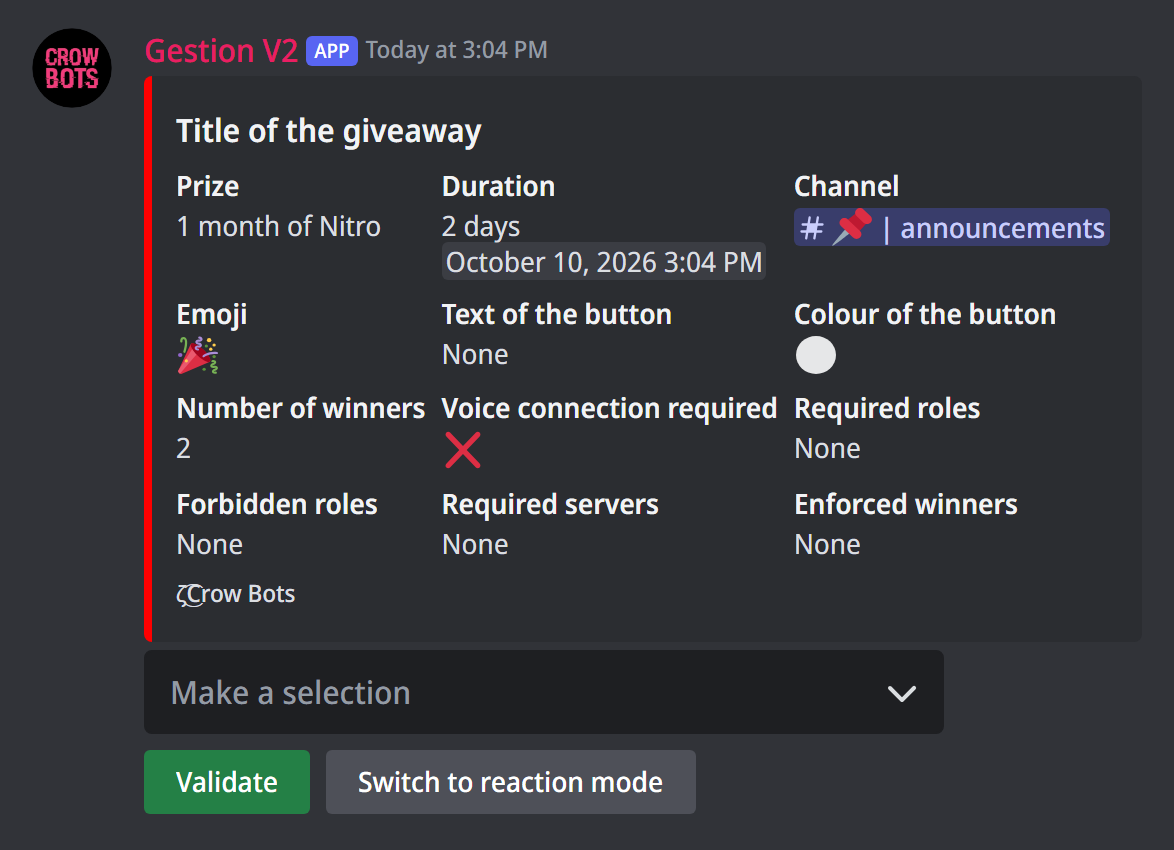
Type +giveaway. The panel shows the settings, and the Make a selection menu changes each of them. The bot then asks you the question in the channel: answer with a message.
- Prize: what the winners get, for example "1 month of Nitro".
- Duration: how long the giveaway stays open (
30m,2h,3d…). 10 hours by default. - Channel: where the giveaway is posted.
- Number of winners: 1 by default.
- Emoji: the button's or the reaction's (🎉 by default).
The panel starts from your last giveaway's settings: to run a similar one, changing the prize is often enough.
Button or reaction
By default, members enter by clicking a button under the giveaway: clicking again withdraws the entry, and the number of entrants shows under the giveaway. For this button you can set a text and a colour (grey, blue, green or red).
Switch to reaction mode replaces the button with a reaction to add to the message; Switch to button mode goes back to the button.
Conditions to enter
These settings are optional:
- Required roles: one of these roles is needed to enter;
- Forbidden roles: with one of these roles, entering isn't possible;
- Required servers: entrants must also be members of another of your servers (the bot must be there). The bot shows you the list of its servers: answer with their numbers;
- Voice connection required: only entrants connected to voice when the draw happens can win.
A member who doesn't meet a condition is told when they try to enter: by a message only they can see with the button, by direct message with a reaction (depending on your direct message settings), and their reaction is removed. The draw checks the conditions again: a member who has lost the required role in the meantime can't win.
Enforced winners
Enforced winners: the members you give always win. The other places are still drawn at random. Handy for a prize already promised, or to complete a draw made elsewhere.
Step 2: launch the giveaway
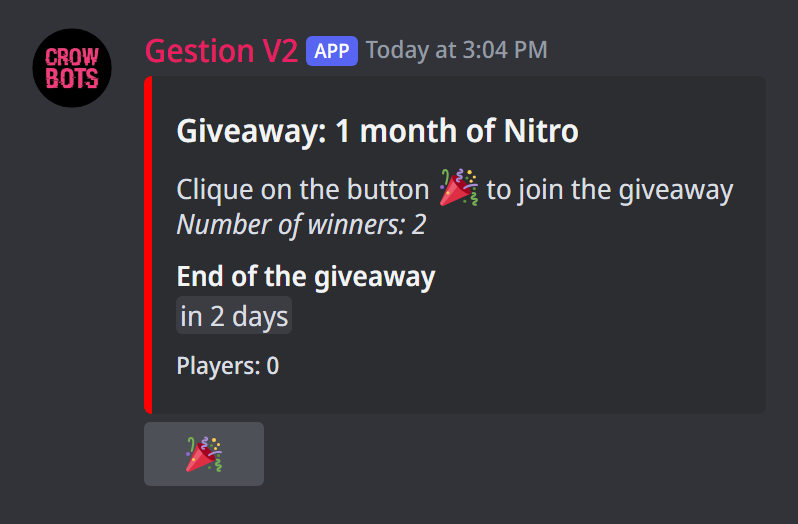
Click Validate: the giveaway is posted in the chosen channel, with its end date. The bot must be able to write and post embeds in that channel.
When it ends, the bot replaces the message with the list of winners and congratulates them in the channel. If nobody meets the conditions, it says so too.
Editing a running giveaway
+giveaway followed by the giveaway's message ID reopens its panel: you can change the prize, the duration, the conditions… then Validate updates the message. To copy a message's ID, turn on Discord's developer mode (Settings › Advanced), then right-click the message › Copy Message ID.
During and after the giveaway
+participantfollowed by the message ID shows the entrants of a button giveaway (for a reaction, the list is under the reaction itself);+end giveawayfollowed by the message ID ends it right away: the draw happens as if time were up;+rerolldraws the last ended giveaway of the server again, with the same conditions: useful when a winner doesn't answer.
An instant draw on a message
+choose draws among the members who reacted to a message that already exists: a poll, an announcement… The panel is the giveaway's, without the duration or the button: set the prize, the channel where the winners are announced, their number, the emoji to count and the conditions, then pick Validate in the menu and give the message ID.
You can give the prize and the channel straight away: +choose Nitro #announcements.
If it doesn't work
- "You must choose a channel for the giveaway first": pick a channel in the menu before validating.
- The giveaway isn't posted: the bot must be able to write and send embeds in that channel.
- A member can't enter: check the required or forbidden roles, and the required servers.
- "No recent giveaways found" with
+reroll: there is no ended giveaway left to draw again; use+chooseon the message instead.
Every command
Each command of this guide, with its arguments, its default level and examples: Giveaways.