
Emojis and stickers
Add emojis and stickers to the server with a command, and keep an emoji for some roles.
On this page
These commands add emojis and stickers to your server without going through its settings, and keep an emoji for some roles.
In short
+create :emoji: cat: copies an emoji from another server;+newstickerin reply to a sticker: copies it;+restrict :emoji: @VIP: only the VIP role can see and use the emoji.
Adding emojis
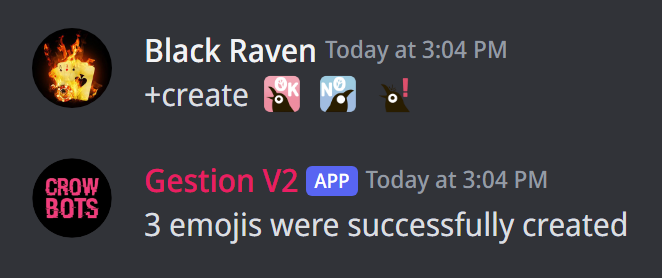
+create creates an emoji on the server, in three ways:
- copy an emoji from another server by pasting it in the command:
+create :emoji: cat. You can copy several at once, each followed by its name if you like; - attach a picture (256 KB at most):
+create catwith the picture; - reply to a message with
+create: every emoji of the message is copied.
A name is 2 to 32 letters, digits or _. The server needs a free slot; animated emojis have their own slots.
Adding stickers
+newsticker creates a sticker: send the sticker with the command, or reply to the message that holds it. +newsticker dancing-cat gives it a name; without one, the copied sticker's name is kept. The server needs a free slot.
Keeping an emoji for some roles
+restrict :emoji: @VIP makes an emoji visible and usable only by members with that role: the others don't even see it any more. You can give several roles (+restrict :emoji: @VIP @Booster). Only the server's custom emojis can be restricted.
- To change the roles, run
+restrictagain with the new list: it replaces the old one. +unrestrict :emoji:gives the emoji back to everyone (several emojis at once work too).
If it doesn't work
- The emoji isn't created: the server has no free slot left, the picture is over 256 KB, or the name isn't valid.
- You can't paste another server's emoji: Discord keeps that for Nitro members; attach its picture instead.
Every command
Each command of this guide, with its arguments, its default level and examples: Emojis and stickers and Restricted emojis.