
Teams
Teams of members with their captain, their role, their shared bank, their leaderboard and their own shop.
On this page
Your members group into teams: each team has its captain, its role on the server and its bank, which its members fill together. Teams compare themselves on a leaderboard, and spend their money in the team shop: a private channel, a role name or colour… Ecrownomy answers in French: this guide quotes its panels and messages as they appear.
In short
*team settings(administrators): choose the captain role.- A member with this role creates their team with
*team create. - The others join it with
*team join <team>, and support it with*team bank 1000.
Setting up teams
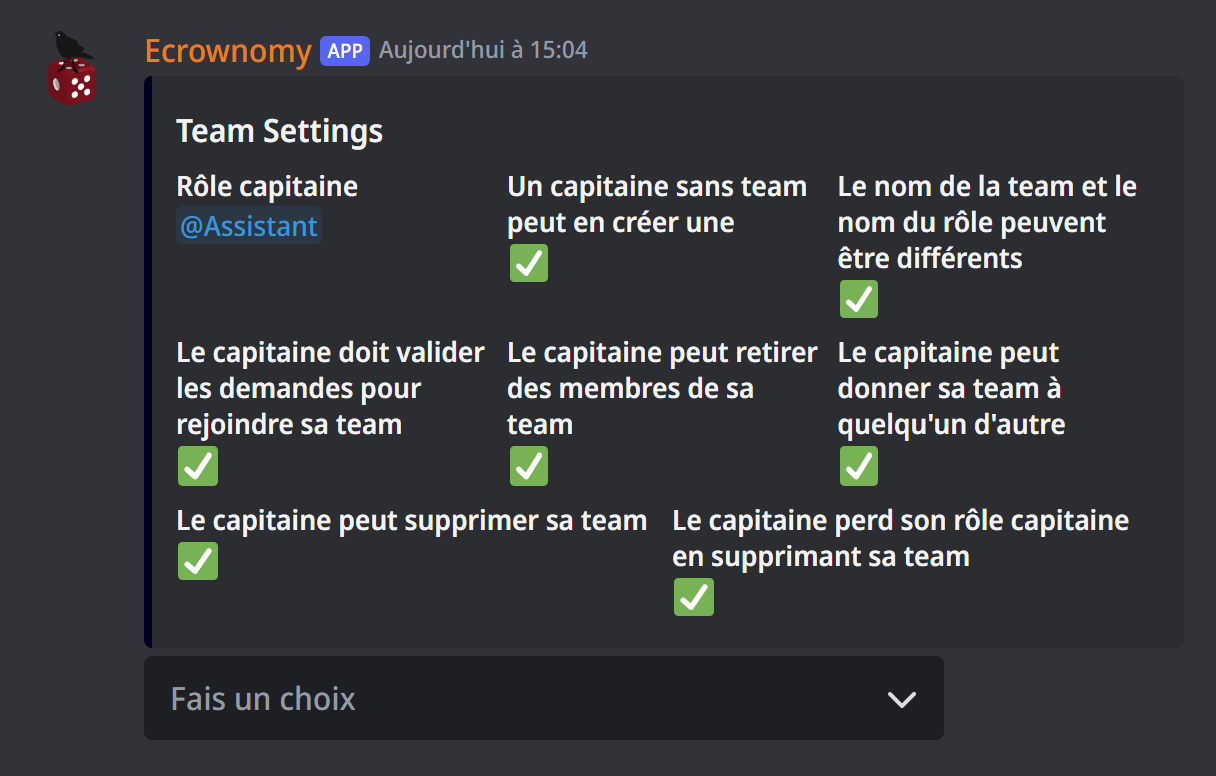
*team settings (administrators) opens a panel:
- Changer le rôle capitaine (captain role): only members with this role can create a team, and they can't join another one. Without a captain role, there are no teams;
- Peut créer une team: captains can create their team themselves;
- Le nom de la team et du rôle peuvent être différents: the captain also chooses the role's name;
- Doit valider les demandes: the captain accepts or refuses each member who wants to join;
- Peut retirer des membres, Peut donner sa team, Peut supprimer sa team: what the captain is allowed to do (remove members, give the team away, delete it);
- Perd son rôle en supprimant sa team: the captain loses the captain role when they delete their team.
Everything is on by default.
Creating and running your team
For the captain:
*team create: the bot asks for the team's name (3 to 80 characters, no special characters or emojis), its role's name if allowed, and its colour, then creates the team's role;*team kick @memberremoves a member from the team;*team transfer @membergives the team to another of its members, who becomes the captain (after a confirmation);*team deletedeletes the team.
Being part of a team
In the game channels:
*team join The Crowsasks to join a team: the captain accepts (✅) or refuses (❌) the request; if requests don't need approval, you join at once and get its role;*team leaveleaves your team (the captain can't leave: they give the team away or delete it);*myteamshows your team: its captain, its members and its bank;*team bank 1000puts 1,000 of your money into your team's bank. This payment is final.
The team leaderboard
*team list (or *team lb) ranks the server's teams by their bank, with their role, their member count and their captain. *autolb team on #leaderboard shows it live in a channel.
The team shop
The captain spends the team's bank in the team shop:
*team shopshows what's for sale and the prices;*team buy <item>buys one of the items:- a team text channel and a team voice channel: private channels, kept for the team;
- a change of colour, name or icon of the team's role (the icon needs a server boosted to level 2).
*team shop settings (administrators) sets each item: the price (or taking it off the shop), the maximum per team, the category where channels are created, whether game commands are allowed there, whether the captain can manage their permissions, and the message sent on purchase.
For administrators
*team delete The Crowsdeletes a team;*set The Crows capitaine @memberchanges a team's captain;*team money add The Crows 5000and*team money remove The Crows 5000add or remove money in a team's bank.
If it doesn't work
- "Le rôle capitaine n'est pas paramétré" (the captain role isn't set): choose it in
*team settings. - "Vous avez le rôle capitaine, vous ne pouvez pas rejoindre de team" (you have the captain role, you can't join a team): a captain creates their own team.
- "Vous avez déjà une demande en cours" (you already have a pending request): wait for the captain's answer, or cancel your request by clicking ❌ under it.
- "Le shop de team n'est pas disponible" (the team shop isn't available): no item is for sale; administrators set them in
*team shop settings. Only a captain sees the team shop.
Every command
Each command of this guide, with its arguments and who can use it: Team management (in French).