
The starboard
Showcase in a channel the messages that get the most reactions.
The starboard is a channel where the bot reposts the messages that get many ⭐ reactions: the best of your server, picked by your members. Crow Tools answers in French: this guide quotes its panel as it appears.
In short
;starboardopens the panel.- Choisir le salon (pick the channel): the starboard channel.
- Activer/désactiver (turn on/off): the starboard is running.
How it works
When a message reaches the entry threshold (7 ⭐ by default), the bot reposts it in the starboard channel: the author, the text, the picture, the message it replied to, and a link to the original message. Above it, the reaction count and the original channel update with each new reaction.
If members remove their reactions and the message drops below the exit threshold (5 by default), it's removed from the starboard.
The settings
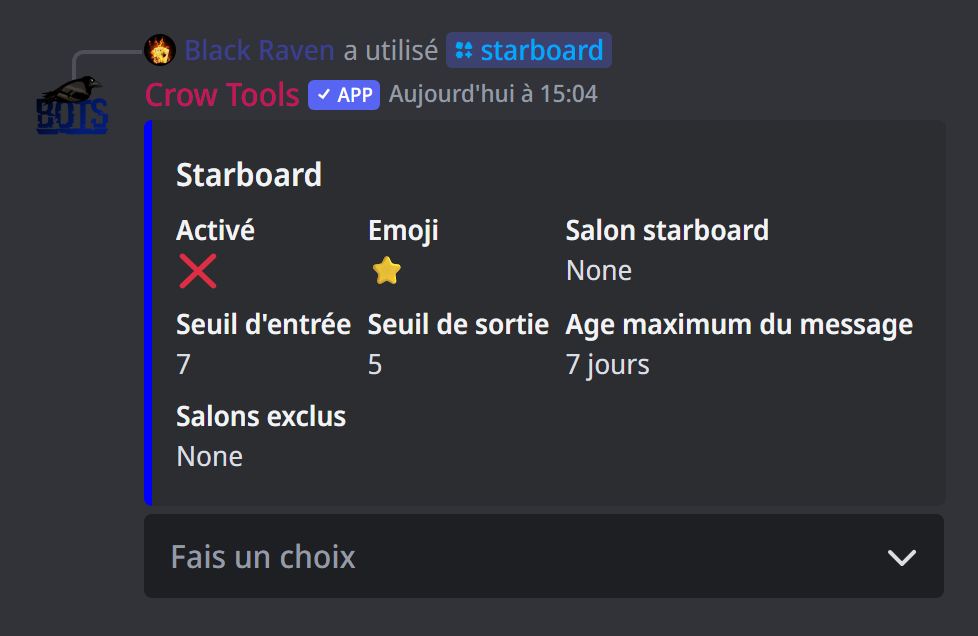
;starboard (administrators) opens a panel showing the current settings, with a menu:
- Activer/désactiver: turn the starboard on or off;
- Choisir l'émoji: the emoji to count (⭐ by default);
- Choisir le salon: the starboard channel;
- Seuil d'entrée (entry threshold): the number of reactions to enter the starboard;
- Seuil de sortie (exit threshold): below it, the message leaves; it stays lower than the entry threshold;
- Age maximum: reactions on an older message no longer count (7 days by default);
- Modifier les salons exclus (excluded channels): channels whose messages never enter the starboard.
If it doesn't work
- No message arrives: check that the starboard is on, that the channel is chosen, and that the bot can write and post links there. The server must be in the whitelist.
- A message with many reactions isn't there: it may be older than the maximum age, or in an excluded channel.
Every command
Each command of this guide, with its arguments and who can use it: Statistics (in French).