
Polls
Create a poll with buttons, whose results show as a chart that updates with each vote.
Ask your members a question: everyone votes with a click, and a chart of the results updates with each vote. Crow Tools answers in French: this guide quotes its panel as it appears.
In short
;pollopens the poll panel.- Add at least two options, choose the channel and the duration.
- Click Valider le sondage (confirm the poll): it's posted.
Creating a poll
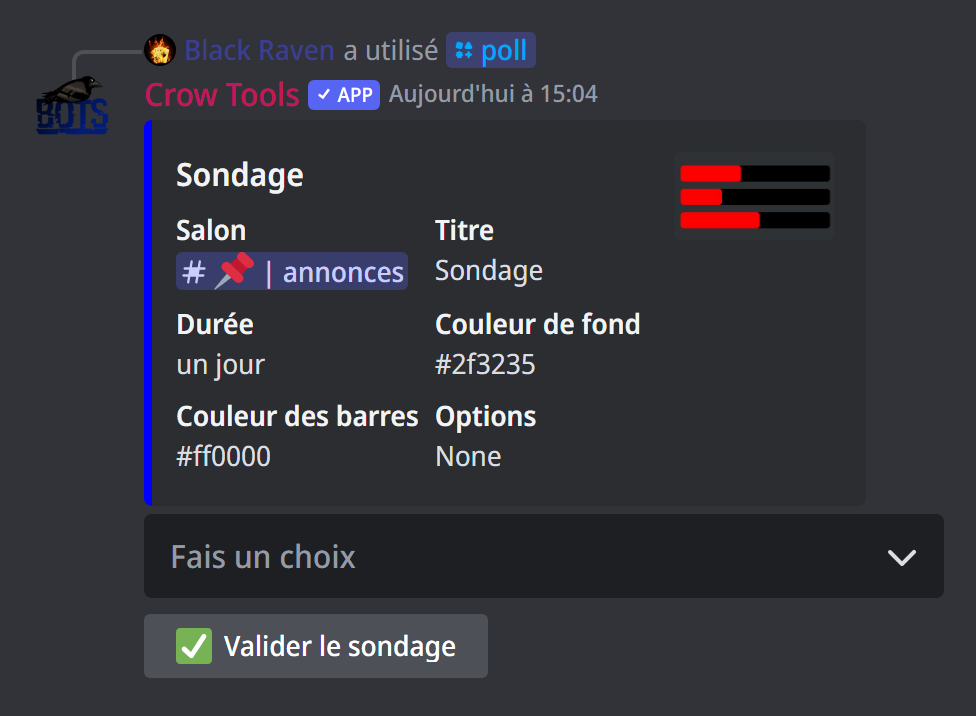
;poll (administrators) opens a panel showing the poll being prepared, with a menu:
- Changer le salon: the channel the poll will be posted in;
- Changer le titre: the title ("Sondage" by default);
- Modifier la durée: the duration,
2h,3d… up to 7 days. The chosen duration becomes the default for your next polls (1 day at first); - Ajouter une option and Supprimer une option: add or remove an answer, up to 25;
- Type bar chart or Type pie chart: results as bars or as a pie;
- Changer la couleur de fond and Changer la couleur des barres: the chart's background and bar colours, as a hex code.
Click Valider le sondage to post it, with at least two options.
Voting
Up to 5 options, each answer has its button; beyond that, the answers are in a menu. Each member has one vote: voting for another option moves their vote. The chart updates as votes come in.
At the end of the duration, the poll closes and shows the final result.
Editing a poll
;poll <ID> reopens the panel of a poll already posted, with the ID of the poll's message: to fix the title, add an option, extend the duration… Confirm again to update the poll.
If it doesn't work
- "Veuillez enregistrer au moins deux options avant de valider" (save at least two options before confirming): add a second option.
- "Il n'y a pas de sondage sur ce message" (there's no poll on this message): check the ID; it's the one of the message carrying the poll's buttons.
- "Couleur invalide" (invalid colour): use a hex code, such as
#FF0000.
Every command
Each command of this guide, with its arguments and who can use it: Statistics (in French).