
Automatic roles
Roles given by themselves to the most active member, to the server's veterans, to loyal boosters, to members in voice and to those with a Discord badge.
On this page
Crow Tools gives and removes roles by itself, according to what your members do: the most active of the week, the server's veterans, loyal boosters, those in voice right now… These commands are kept for administrators. Crow Tools answers in French: this guide quotes its panels as they appear.
In short
;star on msg semaine @Star: the member who wrote the most messages in the last 7 days gets @Star;;role ancient add @Veteran 365: the @Veteran role after a year on the server;;role voc: a role for members in voice.
For all these roles, the bot's role must be above them in the role list, and you can only pick a role below your own highest role. The server must be in the whitelist.
Other automatic roles have their own guide: level roles, invite roles and the birthday role.
Star roles: the most active
A star role goes to the server's most active member, and moves to someone else as soon as they're overtaken. There are four (jour = day, semaine = week):
| Command | The role goes to the member who… |
|---|---|
;star on msg jour @Star |
wrote the most messages in the last 24 hours |
;star on msg semaine @Star |
wrote the most messages in the last 7 days |
;star on voc jour @Star |
spent the most time in voice in the last 24 hours |
;star on voc semaine @Star |
spent the most time in voice in the last 7 days |
;star off msg semaineturns a star role off;;star rolesshows the star roles and the excluded roles;;star deny @Staff: members with this role never get a star role (your team, for instance);;star allow @Staffputs them back in the running.
Seniority
;role ancient add @Veteran 365: the @Veteran role after 365 days on the server;;role ancient del @Veteranremoves this reward,;role ancient listshows the seniority roles;;role ancient cumul on: members keep every seniority role they earned; withoff, they only keep the highest.
A new role is applied at the next role update, which can take a while.
Loyal boosters
The same thing, by how many days a member has been boosting the server:
;role boost add @Loyal-booster 90: the role after 90 days of boosting;;role boost del,;role boost listand;role boost cumul on/off, as for seniority.
Members in voice
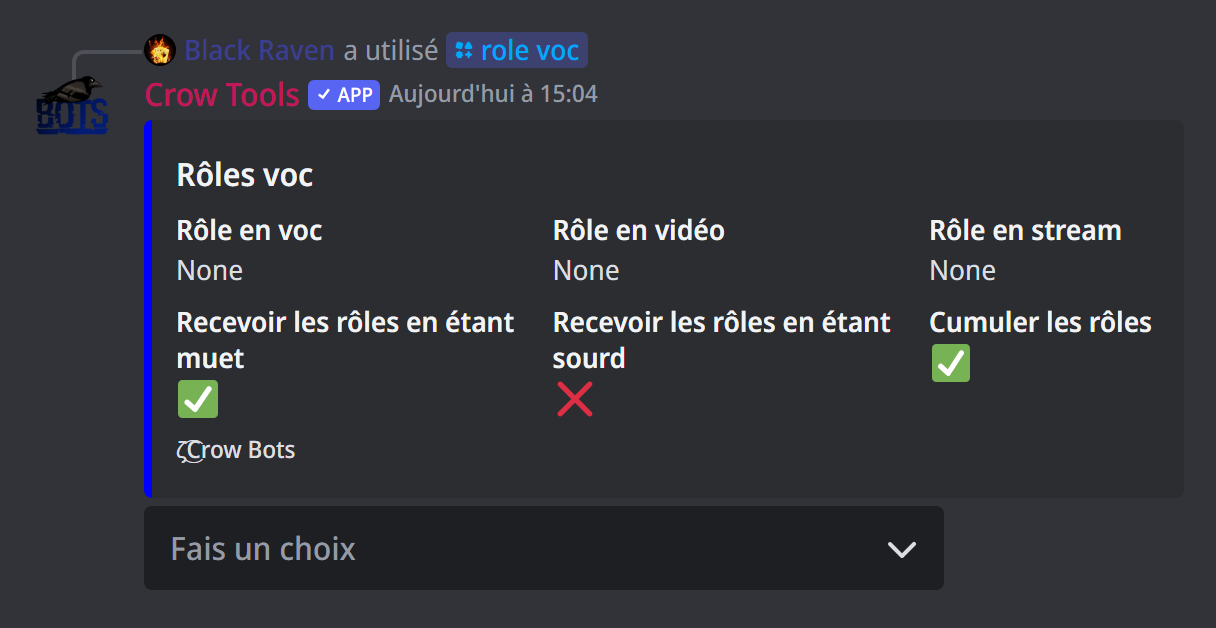
;role voc opens a panel to give a role to members while they're in voice, and remove it when they leave:
- Modifier le rôle en voc: the role for members in voice;
- Modifier le rôle en vidéo: the role for members with their camera on;
- Modifier le rôle en stream: the role for members sharing their screen;
- Recevoir les rôles en étant muet (get the roles while muted, on by default) and Recevoir les rôles en étant sourd (get the roles while deafened, off by default);
- Cumuler les rôles (stack the roles, on by default): a member on camera also keeps the voice role.
Handy to open a text channel only for members in voice.
Discord badges
;role badge add hypesquad-bravery @Bravery gives a role to every member who has this Discord badge on their profile. Members already there get it gradually; after that, the bot updates badge roles regularly, for new members as well as for those who get a badge.
The possible badges: staff, discord-certified-moderator, partner, hypesquad, hypesquad-brilliance, hypesquad-bravery, hypesquad-balance, bug-hunter, bug-hunter-level-2, active-developer, early-verified-bot-developer and early-supporter.
;role badge del hypesquad-bravery removes this badge role, ;role badge list shows them.
If it doesn't work
- The role isn't given: move the bot's role above this role in the server's role list.
- "Ce rôle ce trouve au-dessus de vous" (this role is above you): pick a role below your own highest role.
- A seniority or boost role is slow to come: it's given at the next role update.
Every command
Each command of this guide, with its arguments and who can use it: Statistics (in French).