
Server profiles and reputation
A profile for each member with their description, level, invites, badges and reputation, fields you invent, and members' previous names.
On this page
Each member has a server profile: their description, colour, level, invites, reputation, badges… You choose what it shows, and you can add your own fields to it (their favourite game, their country…). Crow Tools answers in French: this guide quotes its panels and messages as they appear.
In short
;profilshows your profile,;profil @membersomeone else's;;profil-set description Strategy games fanfills in your description;;rep @membergives them a reputation point.
These commands are public: your members use them in the public channels. ;help profil also sums them up in Discord.
What a profile shows
;profil @member shows, according to your settings:
- their description and colour, which they choose themselves;
- their profile picture and banner;
- their birthday (see birthdays);
- their official badges (Discord's) and their server badges (see below);
- the fields you added;
- their level, invites and reputation.
Filling in your profile
;profil-set <field> <value> changes a field of your own profile:
;profil-set description Strategy games fan;;profil-set colour blue(a colour name or a hex code, as for;theme);;profil-set Favourite game Minecraftfor a field you added.
For a field you added, without a value, the field is cleared. As a slash command, /profil-set suggests the list of fields.
;profil-put @member <field> <value> (administrators) fills in a field on another member's profile, even a field that isn't in your settings: the member then can't change it themselves. Handy for a rank, an in-game role, a distinction.
Profile settings
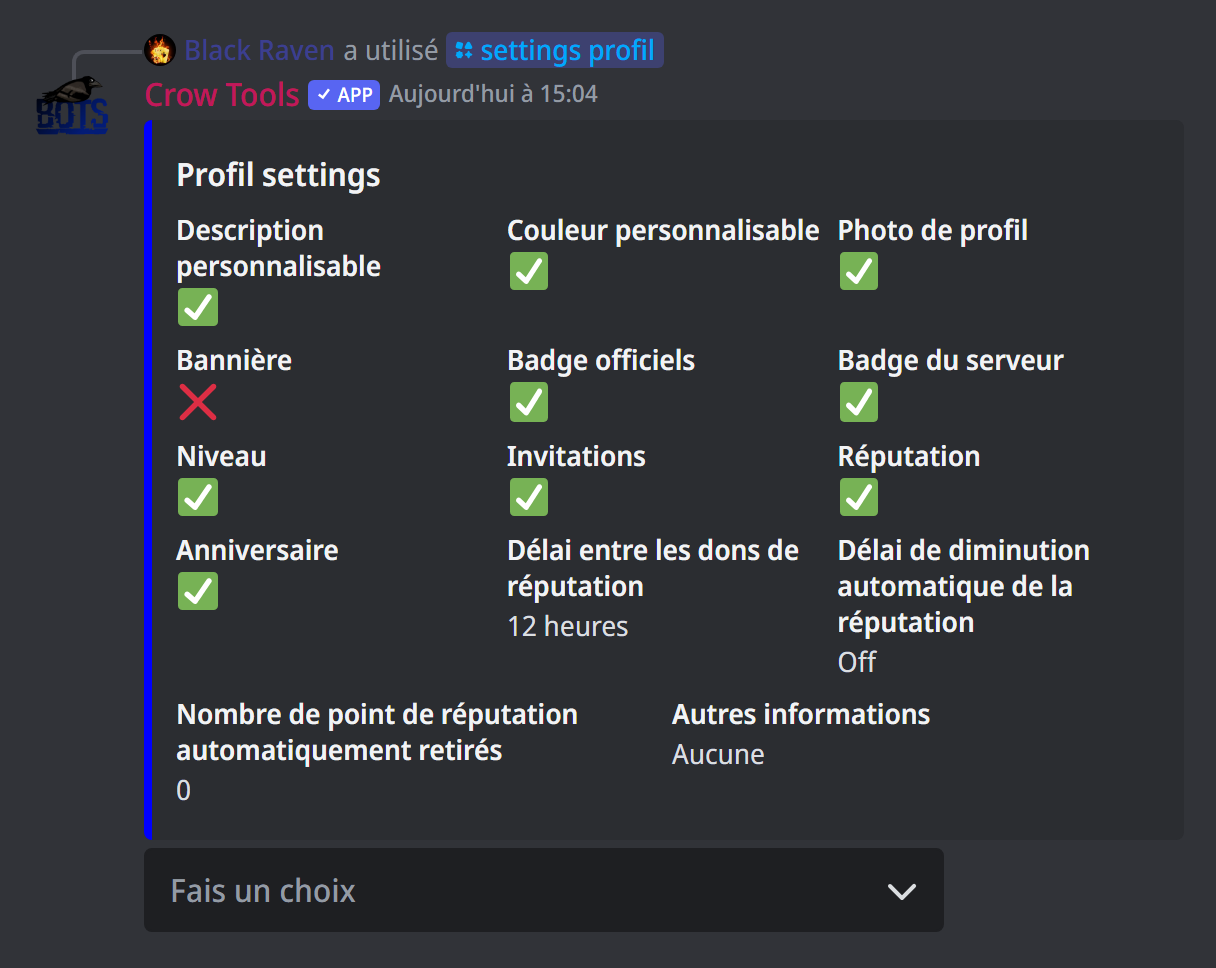
;settings profil (administrators) opens a panel showing the current settings, with a menu to change them:
- show or hide each element: the description, the customisable colour, the profile picture, the banner, the official badges, the server badges, the level, the invite count, the reputation, the birthday;
- Ajouter une information and Retirer une information (add or remove a field): the fields your members fill in with
;profil-set(up to 25); - the reputation settings.
By default, everything is shown except the banner.
Server badges
A badge is an emoji shown on the profile, a distinction you give:
;profil-badge @member 🏆adds the 🏆 badge to a member's profile; run the same command again to remove it;;profil-badge @Champion 🏆shows it on the profile of every member with this role;;badge 🏆lists the members and roles that have this badge.
A custom emoji works too, if it comes from a server the bot is on. Both commands are kept for administrators.
Reputation
Your members thank each other by giving reputation points:
;rep @membergives a point. You can't give yourself one, and you then have to wait before giving another: 12 hours by default;;leaderboard repshows the reputation leaderboard.
In ;settings profil, you set the delay between two gifts, and an automatic decrease: for instance, every member loses 1 point every 7 days (at least a day between two decreases), so that reputation reflects recent activity.
;managerep (administrators) manages reputation by hand: ;managerep add 5 @member adds 5 points, ;managerep del 5 @member removes some, ;managerep reset @member resets a member to zero, and ;managerep resetall every member.
Previous names
The bot remembers changes to members' Discord display name (not their server nicknames):
;prevnames @membershows their previous names, with their dates; you can also right-click the member, then Apps › prevname;;clear-prevnamesclears your own history.
If it doesn't work
- "Vous devez attendre encore … avant de pouvoir donner un point de réputation" (you must wait … before giving a reputation point): the delay between two gifts hasn't passed.
- "Champ inconnu" (unknown field): this field doesn't exist; add it in
;settings profil, or check its spelling. - "Cet émoji n'est pas valide ou je n'y ai pas accès" (this emoji isn't valid or I can't access it): use an emoji from a server the bot is on.
Every command
Each command of this guide, with its arguments and who can use it: Public commands and Server management (in French).