
Arrival and departure messages
Announce each arrival and each departure, with who invited the member, as text or in an embed.
On this page
Crow Tools can announce each arrival and each departure in a channel, saying who invited the member and how many invites that inviter already has. The message is plain text or an embed. Crow Tools answers in French: this guide quotes its messages and buttons as they appear.
In short
;join channel set #arrivals: the channel for arrival messages.;join message Welcome {MemberMention}, invited by {InviterMention} ({InviterTotalCount} invites)!- Do the same for departures with
;leave channel setand;leave message.
Arrival and departure messages work the same way: this guide shows ;join, use ;leave instead for departures. They need the same conditions as counting invites: the bot must have the Administrator permission.
Step 1: the channel
;join channel set #arrivals chooses the channel (without a channel, the one where you type the command). The bot shows the old channel, the new one, and the current message.
;join channel del removes the channel: no arrival message is sent any more.
Step 2: the message
;join message <message> saves the text, with variables the bot replaces at each arrival:
;join message {MemberMention} joins us, invited by {InviterMention} who now has {InviterTotalCount} invites. We are {ServerMembersCount}!
{MemberMention}mentions the new member,{InviterMention}whoever invited them;{InviterTotalCount}gives the inviter's total invites,{ServerMembersCount}the member count.
Case doesn't matter: {membermention} works too. All the variables are on a page of their own, and ;help msg lists them in Discord. ;join message none clears the message.
When the bot doesn't know who invited
If the member came through the server's custom link, or if the bot doesn't know who invited them, it doesn't send your message but a ready-made French sentence, filled with the details your message asks for: "Name nous a rejoint en utilisant le lien d'invitation personnalisé du serveur." (joined with the server's custom link) or "Name nous a rejoint, je ne sais pas qui l'a invité." (joined, I don't know who invited them). On departure: "Name vient de nous quitter, …" (just left us).
A message in an embed
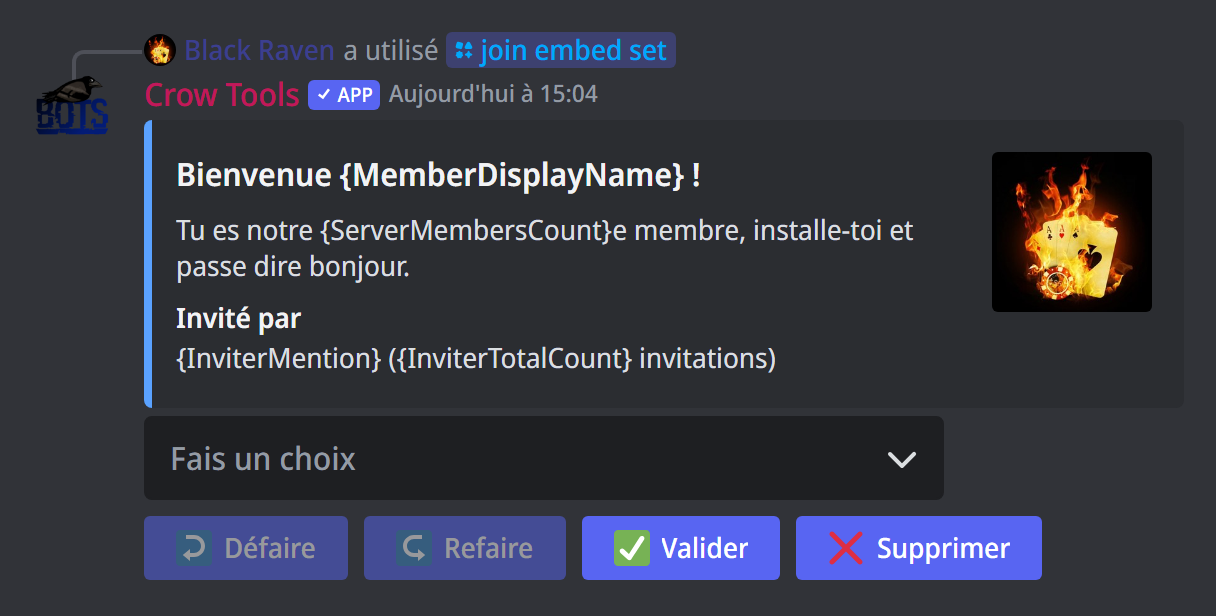
For a neater message, with a title, a colour and a picture:
;join embed setopens the embed editor: a menu to change the title, the description, the author, the footer, the thumbnail, the image, the URL, the colour and the fields, or to copy an existing embed. Variables work anywhere in the embed. Click Valider (confirm) to save, Supprimer (delete) to clear the embed.;join embed onsends the embed instead of the text message (;join embed offgoes back to the text).;join embed testsends the embed in the arrival channel, as if you had just arrived; the invite numbers in it are examples.
{MemberPic} and {InviterPic}, used as the image, thumbnail or author icon, show the member's or the inviter's profile picture.
When the inviter is unknown, each part of the embed that contains an inviter variable is replaced by a ready-made sentence: "Je ne sais pas qui l'a invité" (I don't know who invited them), or "Il a rejoint grâce à l'invite personnalisée" (joined with the custom invite). So put the inviter's details in a part of their own, a field for instance: the rest of the embed stays intact. For an arrival through the custom link, {InviterPic} as the thumbnail shows the server's icon.
Checking the settings
;settings invite shows, for arrivals and departures, the channel and the message (or Embed), along with the invite settings.
If it doesn't work
- No message is sent: check the channel (
;settings invite), that the bot can write there, and that it has the Administrator permission. With no message or embed saved, nothing is sent. - The message arrives late: a
;safejoinis set; the bot waits before announcing the arrival. - "Je ne sais pas qui l'a invité": see what the bot counts.
- A variable shows as typed: check its spelling on the variables page; invite and inviter variables only work in arrival and departure messages.
Every command
Each command of this guide, with its arguments and who can use it: Invites (in French).