
Setting up the games
Who can play what and where, direct messages included, each game's gains and odds of winning, the slot machine's emojis, drops and the counting channel.
On this page
Each server sets up its games: who can play them, how much they pay and how easy they are to win. These commands are kept for administrators, unless stated otherwise. Ecrownomy answers in French: this guide quotes its messages as they appear.
In short
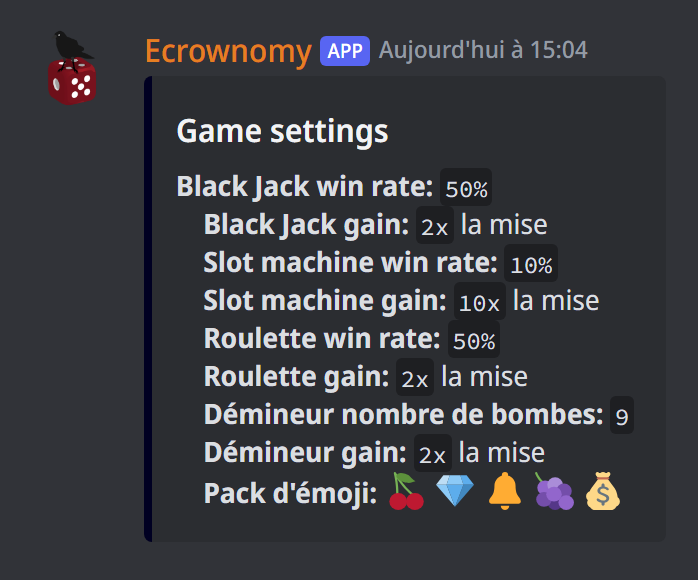
*add required blackjack @Player: the @Player role is needed to play blackjack;*set slotmachine gain 15x: the slot machine pays 15 times the stake;*game settingsshows the server's game settings.
To name a game, use its name or its shortcut: slotmachine (sm), blackjack (bj), roulette (r), demineur (minesweeper), 4align (4a), morpion (ttt, tic-tac-toe), pfc (chifoumi, rock-paper-scissors), pendu (hangman), mastermind (mm), clickmoji, reaction smash (rs), roulette russe (rr), poker, and give for money gifts.
Who can play
On the server, your members play in the game channels. Each game can also require or forbid roles:
*add required blackjack @Player: you need at least one of the required roles to play;*add deny blackjack @Punished: a member with a forbidden role can't play;*del required blackjack @Playerand*del deny blackjack @Punishedremove them.
You can give several roles at once. *game perms shows each game's required and forbidden roles. Administrators and owners can always play.
In direct messages
The slot machine, blackjack, roulette, minesweeper, pendu (hangman), mastermind, gifts and poker can also be played in direct messages with the bot. *mp perm <game> <on/off/sync> (owners) chooses who has access:
on: everyone;off: no one;sync(the default): members allowed to play on one of the bot's servers, according to those servers' required and forbidden roles.
*game perms mp shows these settings. Poker is only played in direct messages; the multiplayer games, only on a server.
Gains and odds
| Game | Default gain | Default odds of winning |
|---|---|---|
| Slot machine | 10 times the stake | 10% |
| Blackjack | 2 times the stake | 50% |
| Roulette (colour, even, odd) | 2 times the stake | 50% |
| Minesweeper | 2 times the stake | depends on the number of bombs (9) |
| Pendu (hangman) | up to 2 times the stake, less for each mistake | depends on the player |
| Mastermind | up to 2 times the stake, less for each try | depends on the player |
*set slotmachine gain 15x: what a won game pays, as a multiple of the stake;*set pendu gain 3x: what a hangman won without a mistake pays, at least1x; each mistake takes a share off, down to barely the stake with 5 mistakes;*set mastermind gain 3x: what a mastermind found on the first try pays, at least1x; each extra try takes a share off, down to the stake alone on the 10th;*set blackjack winrate 45%: the odds of winning this game (0 to 100%);*set demineur bombes 12: the number of minesweeper bombs, from 1 to 72;*game settingsshows the server's gains, odds, bombs and waits.
Multiplayer games have no gain or odds to set: the winner takes the other players' stakes.
In direct messages, games follow the direct-message settings: an owner changes them by typing the same commands in a direct message with the bot. *import game settings copies the gains, odds, bombs and waits from another of the bot's servers, or from the direct messages: the bot shows you the list and you answer with a number.
A wait between two games
So a member doesn't play non-stop, set a wait between two games of a solo game: the slot machine, blackjack, roulette, minesweeper, pendu (hangman) or mastermind.
*set pendu cooldown 5m: 5 minutes between two games of pendu, for each member;*set pendu cooldown 0: no more wait.
The wait counts from the start of the game. A member who comes back too soon sees when they can play again. Durations are written in s, m, h or j (days; 30s, 1h30m), 7 days at most. No wait by default. At the roulette, a member who already bet on the current spin can still add bets to it. Multiplayer games have no wait.
Drops
Drops make money appear in a channel while your members chat: the first to click Ramasser (pick up) takes it.
*drop channel #general: drops appear in this channel (without a channel, the one you type the command in);*drop amount 200 1000: each drop holds an amount drawn between these two (100 to 500 by default);*drop interval 1h: at least this long between two drops (30 minutes by default, 1 minute at least);*drop offturns them off,*dropshows the settings.
After that delay, the next drop comes when several members are chatting on the server (in any channel): a quiet server gets none. There is one drop at a time; a drop nobody picks up disappears after 5 minutes.
The counting channel
In the counting channel, your members count up from 1, each in turn.
*count channel #counting: this channel becomes the counting channel (without a channel, the one you type the command in);*count mistake restart(default): a mistake restarts the count at 1, and the bot names the member who broke the series;*count mistake refuse: the message is only marked ❌ and the bot reminds which number comes next;*count reactions off: the bot no longer adds ✅ or ❌ (the mistake messages stay);*count reactions onbrings them back;*count reward 10: each right number pays this amount (nothing by default). Two members counting in turn earn at every number: pick a small amount;*count offturns it off,*countshows the settings, the current number and the server's record.
Any message that isn't a number is deleted from the channel: against spam, the bot deletes them all together a few seconds after the first, and counting goes on meanwhile. Give the bot the Manage Messages permission there. The bot's commands stay.
The slot machine's emojis
The slot machine's reels, as well as clickmoji and reaction smash, draw from emoji packs:
*add pack 🍒 💎 🔔 🍇 💰adds a pack of 5 to 10 emojis (custom emojis work, if they come from a server the bot is on);*remove pack 2removes pack number 2; the last pack can't be removed.
A server holds up to 20 packs, and 60 emojis in all.
If it doesn't work
- "Jeux invalide" (invalid game): check the game's name (the list is at the top of this guide).
- "Ce jeu n'existe pas ou n'a pas de winrate réglable" (this game doesn't exist or has no adjustable odds): multiplayer games have no gain or odds to set.
- "Ce jeux est multijoueur, il n'est donc pas disponible en mp" (this game is multiplayer, so not available in DMs): only solo games and games against the bot are played in direct messages.
- A member can't play: check the channel, then the required and forbidden roles with
*game perms.
Every command
Each command of this guide, with its arguments and who can use it: Game setup (in French).